A portable solar power supply can sit unused for weeks between trips, storms, or outdoor projects. That does not mean it can be stored anywhere, at any charge level. Heat, moisture, dust, and prolonged deep discharge may shorten battery life or affect performance. A cool, dry shelf is a better starting point than a hot garage or a damp shed.
This guide explains How to store a portable solar power supply when not in use, with practical steps for checking, charging, and protecting the unit. Start by turning it off and disconnecting panels and accessories. Clean the casing with a dry, soft cloth, then inspect ports and cables for dirt or damage. Check the manufacturer’s instructions for the recommended storage charge and temperature; battery chemistry and device design can make a real difference. Some models need periodic charging, while others can remain stored longer. There is no single rule for every power station.
A small reminder can help: note the storage date and set a calendar check. That step is easy to forget. Before storing, make sure the unit is fully dry, especially after outdoor use. Keep it away from direct sunlight, heaters, and anything that could press on the screen or ports. These basics reduce avoidable wear, but they cannot guarantee a battery will retain its original capacity. Follow the product manual, and inspect the supply before relying on it for an important trip or emergency.
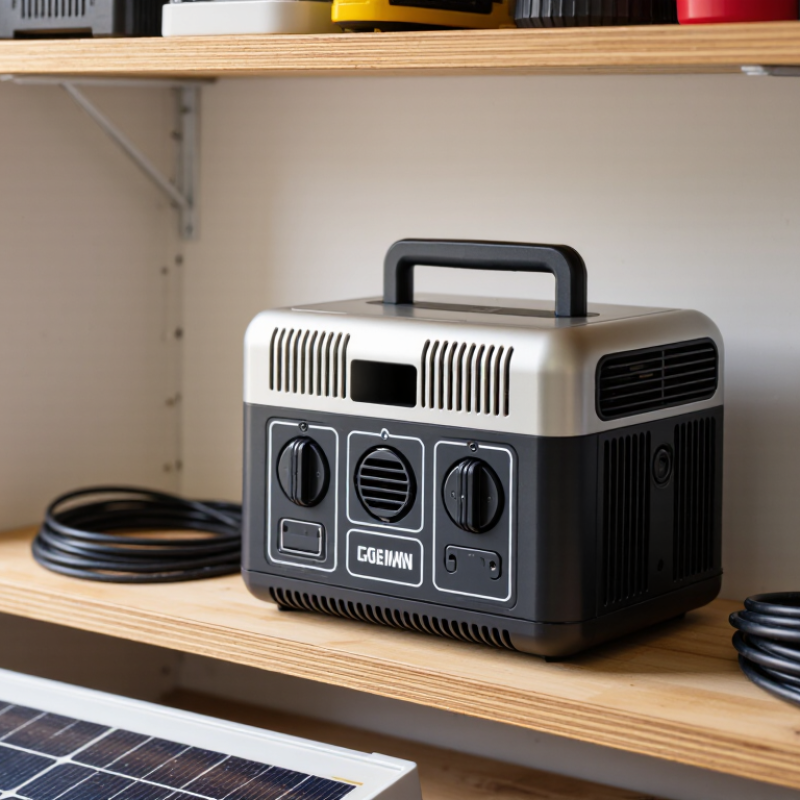
Check the Manufacturer’s Storage Requirements
Before storing a portable solar power supply, check its manual for the exact storage requirements. Battery chemistry, capacity, and built-in electronics can affect the recommended charge level and temperature range. Do not assume that advice for one unit applies to another. If the manual specifies a charge percentage, follow it rather than storing the battery fully charged or nearly empty by guesswork. Keep the unit in a cool, dry place, away from direct sunlight, heaters, and damp floors.
Tips: Disconnect charging cables and accessories, then make sure the ports are clean and dry. If the manual recommends periodic recharging, set a calendar reminder. A quick check can prevent the battery from sitting depleted for months. Small details matter.
It is tempting to rely on a generic battery rule, but that can be wrong. Look for instructions covering long-term storage, inspection intervals, and whether the unit should be switched off completely. If the booklet is missing, check the manufacturer’s official support materials for the model number printed on the device. Avoid leaving it in a parked car, where temperatures can change sharply. Before putting it away, note the storage date and charge level; it is an easy step to forget.
How to Store a Portable Solar Power Supply When Not in Use
Typical lithium-ion battery storage charge level
Storage tip: Some lithium-ion battery guidance recommends storing batteries partially charged rather than full or empty. The 50–80% range shown is general guidance, not a universal requirement. Always check your power supply’s manual for its specific charge level, temperature, and maintenance instructions.
Power Down and Disconnect All Components
Before storing a portable solar power supply, switch off its AC inverter and every output port. Turn off connected appliances, then unplug them one at a time. Wait until the display and indicator lights go dark; some units take a few seconds to shut down fully.
No tugging. Hold each plug or connector, not its cable, and check for warmth, moisture, or damaged insulation. If a connector feels hot or looks damaged, stop and consult the unit’s instructions before handling it further.
Next, disconnect the solar panel and other external charging cables using the sequence in the manual. Port designs differ, so guessing can cause trouble. That detail is easy to overlook.
Handle connectors with dry hands, and avoid separating them while they are wet. Keep loose ends away from metal objects, and fit protective caps if supplied. I have found that a quick glance at the ports can catch dust or grit before it gets pushed inside later.
Leave the unit powered down, and check its manual for the recommended battery charge level during storage; the ideal level varies by model and storage duration.
Clean and Dry the Unit Before Storage
Before storing a portable solar power supply, disconnect it and wipe the casing with a soft, slightly damp cloth. Use a dry cloth around seams, buttons, and ventilation openings. Never spray cleaner directly onto the unit. Check the charging ports closely; dust and moisture can collect around their edges. Let the unit air-dry completely in a shaded, well-ventilated place. No rushing this part. A port that feels cool may still hold moisture, so give it extra time rather than sealing it away.
NREL’s review of nearly 2,000 photovoltaic module degradation estimates reported a median decline of about 0.5% per year. That figure concerns solar modules, not portable battery units, and does not measure moisture damage; it is useful context, not proof of a specific storage risk. For the power supply itself, follow its manual and keep it indoors in a clean, dry spot. Make sure cable ends are dry, too. Avoid hair dryers or direct sunlight for quick drying, since excess heat may harm components. I might be tempted to pack everything as soon as the outside looks clean, but hidden dampness is easy to miss. Check again before closing the storage case.
How to Store a Portable Solar Power Supply When Not in Use? — Clean and Dry the Unit Before Storage
| Storage Step |
Recommended Action |
Why It Matters |
| Power down and disconnect |
Turn off the power station and disconnect solar panels, charging sources, and connected devices before cleaning. |
Reduces the risk of accidental operation and makes the unit easier to handle safely. |
| Clean the exterior |
Wipe dust and dirt from the casing with a soft, dry cloth. If needed, use a lightly damp cloth only as permitted by the user manual. |
Helps prevent grime from collecting around buttons, ports, and ventilation openings. |
| Avoid excess moisture |
Do not immerse the unit or spray liquid directly onto it. Keep moisture out of ports, vents, and seams. |
Portable power supplies are not necessarily waterproof, and liquid ingress can damage electrical components. |
| Dry completely |
After wiping, allow the unit and any cleaned accessories to air-dry fully before packing or storing them. |
Storing damp equipment can encourage corrosion or other moisture-related damage. |
| Clean solar panels separately |
Remove loose dust with a soft cloth. Follow the panel manual for any additional cleaning instructions, and dry the panel before folding or packing it. |
Clean, dry surfaces help protect the panel during storage and keep connectors free of debris. |
| Choose a suitable location |
Store the equipment in a cool, dry, well-ventilated place, away from direct sunlight, heat sources, moisture, and extreme temperatures. |
Excessive heat, cold, or humidity can affect batteries and electronic components. |
| Prepare the battery |
Follow the manufacturer’s instructions for the recommended storage charge level and recharge schedule. Do not assume the unit should be stored fully charged or completely empty. |
Battery storage requirements vary by battery chemistry and product design. |
| Check during long-term storage |
Inspect the unit periodically for visible damage, moisture, or unusual battery changes, and check its charge according to the user manual. |
Periodic checks can help identify storage issues before the next use. |
| Store cables and accessories |
Make sure cables and connectors are clean and dry, coil them loosely, and keep them with the unit in a protected storage area. |
Keeping accessories organized helps prevent tangling and reduces the chance of damage to connectors. |
Choose a Cool, Dry, and Ventilated Storage Location
Choose a cool, dry, ventilated place for your portable solar power supply, such as an indoor utility shelf away from windows and heaters. Direct sun can warm the casing, while damp basements and garages may expose it to moisture or condensation. Keep the unit off concrete floors; a sturdy shelf is better. Leave clear space around its vents, and do not tuck it into a sealed plastic bin. Air needs room to move.
Before storing it, make sure the power supply and its cables are clean and completely dry. Coil cables loosely, without sharp bends, and keep them beside the unit rather than over its vents. A dusty cupboard may seem harmless, but dust can collect around openings over time. Check the manual for the recommended storage temperature and battery charge level, since these vary by model and battery type. I used to think “indoors” was enough; it isn’t always. A room that feels comfortable can still get hot near a radiator or humid after a leak. Check the spot now and then, especially after seasonal temperature changes.
Inspect and Recharge the Battery at Recommended Intervals
Before storing a portable solar power supply, inspect the battery and casing in good light. Look for cracks, unusual swelling, corrosion near the terminals, or a loose charging port. Keep the unit dry and cool, away from heaters and direct sunlight. A clean, dry cloth is usually enough to remove dust. If you notice damage or a strange odor, stop using the unit and follow the manufacturer’s service guidance.
Check the manual for the recommended storage charge and recharge schedule. Battery types differ, so one percentage or interval may not suit every power supply. Set a calendar reminder and check the charge at the stated intervals, especially during long storage. Recharge with a compatible charger, then disconnect the unit and store it without attached devices. It is tempting to assume a full display means the battery is healthy. That can mislead. Watch for charge levels that fall unusually fast, and record changes; a simple note may reveal a pattern you would otherwise miss.
Tips: Keep the manual with the unit. Use a reminder you will actually notice. Don’t leave the battery plugged in indefinitely unless the instructions allow it.
Conclusion
How to store a portable solar power supply when not in use begins with checking the manufacturer’s storage instructions, since recommended charge levels and maintenance schedules can vary. Before putting the unit away, turn it off and disconnect all attached panels, cables, and devices. Wipe away dust and debris, and make sure the power supply and its connections are completely dry to help prevent damage during storage.
Choose a cool, dry, well-ventilated place away from direct sunlight, moisture, and extreme temperatures. Avoid placing heavy objects on the unit, and keep it accessible for routine checks. During extended storage, inspect the battery at the intervals recommended by the manufacturer and recharge it as needed. These simple steps can help preserve battery health, protect the equipment, and ensure the power supply is ready to use when needed again.

 Soweglow Solar